Hi there 
In this release, we are bringing you something we are very excited about: A new AI-native approach for transforming integration artifacts into persistent enterprise intelligence.
This means that we are giving your local AI agents powerful abilities to analyze any information you have about your integration landscape, transforming it into structured, persistent and shared intelligence inside Starlify.
Traditional AI workflows typically stop at:
AI → analysis → report
Starlify introduces a fundamentally different model:
AI → canonical model → persistent graph → shared intelligence → reasoning → engineering
Instead of generating isolated outputs, Starlify builds a continuously evolving enterprise context layer that both humans and AI agents can reason upon.
This release combines:
- AI Skills
- A discovery methodology
- Context engineering instructions
- Iterative reasoning workflows
- Validation and semantic alignment through Ingo
Let’s take a look 
AI-Powered Context Discovery
At the core of the release is a new comprehensive method for AI-Powered Context Discovery.
This method orchestrates an iterative collaboration between local AI models and the Starlify context graph.
By using this method, the generated context proposals produced by the local AI are continuously evaluated and refined by validating them against:
- Syntax
- Semantic correctness
- Existing context
- Canonical models
- Organizational consistency
This creates a controlled feedback loop where AI-generated understanding is incrementally refined into trustworthy enterprise intelligence.
Once this validated context is imported into Starlify, it transforms raw data into a live asset that enables:
- Shared intelligence and persistent organizational memory across teams.
- Network-of-networks reasoning and cross-system alignment.
- A solid foundation for AI-native integration engineering.
Requirements for Context Discovery
To use AI-powered Context Discovery you will need:
- A local AI model or AI coding assistant that can read and use agent skills and CLI tools
- The Starlify Discovery CLI (See below)
- Access to a Starlify workspace
You also need information about your integrations that will be used for the analysis. Our method is flexible and powerful enough to handle any kind of information that you might have. Typical examples include:
- Source code
- Configurations
- Payloads
- API specifications
- Integration assets
- Existing enterprise context
(Note: We have also updated our Starlify Help Center with full documentation on how context discovery works!)
The Starlify Discovery CLI
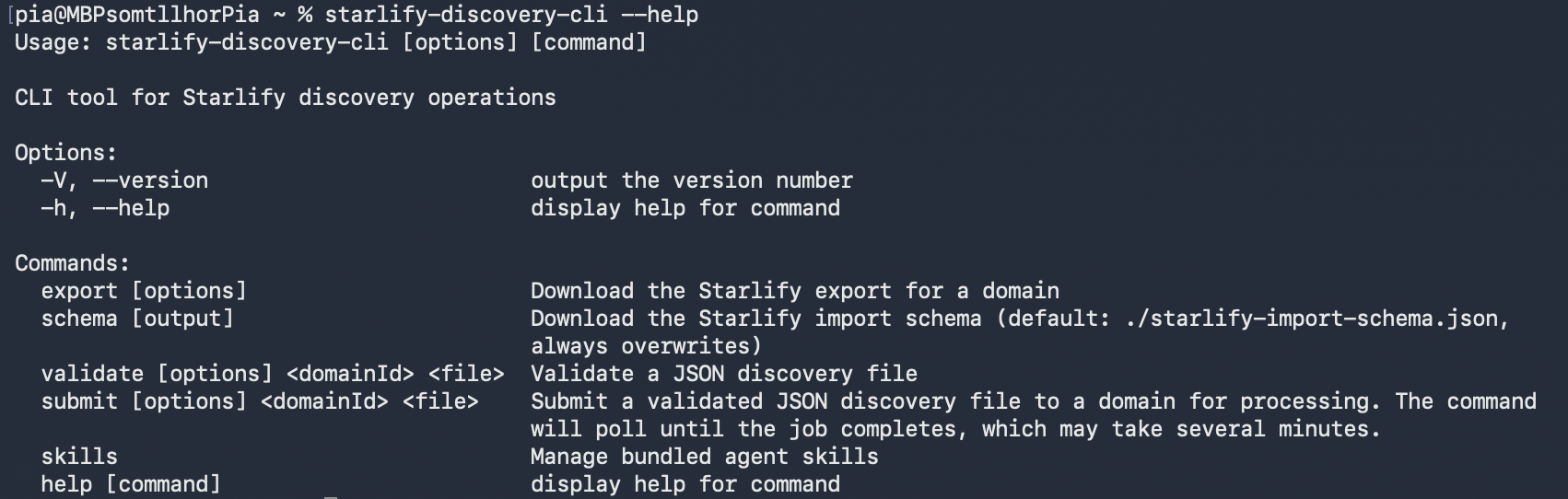
The Starlify Discovery CLI is a command line interface that helps your AI agent understand the discovery method, evaluate its output and communicate with Starlify.
The CLI can be installed from npm.
Once you have installed it, you can use it yourself from any command line or terminal.
You can then install the skills that the agent needs access to, with the following command:
starlify-discovery-cli skills install
This will create all the skills you need for the discovery process in your user’s .agents folder. You can also provide another directory instead if you prefer.
Once this is done, your AI agent will look for relevant skills based on what you ask it to do, and the skills for context discovery will instruct it to use the CLI when appropriate.
The Context Discovery Workflow
The discovery workflow consists of a number of steps that we will explain here. However, once you have started the discovery process, the AI agent will continuously guide you to the next step, thanks to the instructions it gets from the skills. You can read more about each step in the workflow below, but here is an overview:
- Initialization of your environment
- Planning the discovery process for the specific information you have provided
- Perform the first discovery according to the plan
- Validation of the context output
- Submit context to Starlify
- Continue discovery according to the plan
Initialization:
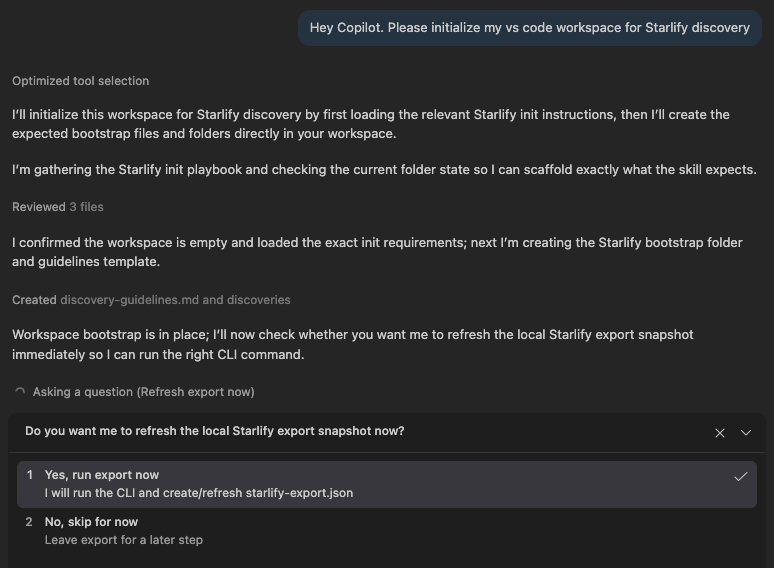
When starting out in a new catalog, you always begin the discovery by asking the agent to initialize for discovery. The agent will look for the initialize skill and start setting up the necessary structure. At this point it will ask you for the Starlify workspace ID, which you will need to get in Starlify. You will also need to create a Starlify API key. The agent will instruct you on how to do this and where to enter the information. Once this is in place, the agent can check the current state of context the Starlify workspace, and you will be ready for the next step.
Planning:
You should now ask the agent to plan the discovery. To do this, the agent will take a close look at everything you have in the work folder, analyze the type of information and gain an understanding of the work needed to perform the discovery. Importantly, it will create a discovery order based on dependencies and complexity. You will be asked to review the plan, and you can make changes as needed.
Context Discovery:
When the plan is in place, the agent is ready to start discovering the context in detail. It will analyze the provided information related to the first integration in the plan. It will then iteratively decide how to represent the integration components in Starlify as systems, services and endpoints. It will map out contracts and references between the components. Then it will document the flows of data, including what data it is and how the data is transformed. The output from this step is a Starlify discovery file which is validated and checked for semantic inconsistencies using the CLI tools. If any problems are found during this validation, for example incorrectly formatted json, or a service with a nonexisting parent system, the agent will continue working until all errors have been fixed. The CLI tools will also provide warnings and comments that you should review. You can always ask the AI agent to resolve these as well.
Validation:
Once the discovery file has been generated, we recommend running an additional validation step, where the AI agent will do an additional thorough investigation of the discovered context against the provided information.
Submit context to Starlify:
When discovery and validation is complete for the given stage of the plan, you may ask the agent to submit the discovery file to your Starlify workspace. The agent will handle this, checking the progress and reporting back to you whether everything worked will or if there were any final issues to resolve. Should there be any problems, the agent will continue working to remedy them.
Discover next:
When the first discovery is done, you can simply tell the agent to "Discover next", and the agent will check the plan to see what it should continue with. The cycle of discovery -> verification -> submit continues until all information you have provided has been analyzed and used for discovery.
Included Discovery methods:
This release includes production-ready optimized discovery methodologies for:
-
MuleSoft
-
BizTalk Server
-
.NET
We have also implemented generic AI-powered Context Discovery methodology which will be able to handle other integration platforms as languages, such as Azure Integration Services. The canonical context model in Starlify is technology agnostic, meaning you can model any kind of platform and integration pattern there.
Additional platform accelerators and discovery packs will be introduced continuously.
Considerations and limitations:
While we have worked hard to make the discovery method powerful, trustworthy and robust, there are some important considerations and limitations to keep in mind while using it.
AI-based methods can make mistakes, so double check its output. We use supporting scripts and deterministic validation procedures to catch as many of these mistakes as possible, but it is still necessary to monitor it closely.
Using a stronger AI model means it can better grasp the information you have provided, and you will get a better result.
Consider the AI's context window. Switch to a new session when changing between discovery steps to allow the agent to start fresh without a cluttered context. Select AI models with larger context windows to allow it to retain more information in each session.
As always, we’d love your feedback
Try it out and let us know what you think 💬